FTP-User can login, but can’t see any directory-listing:
aka “Unable to retrieve directory-listing”
aka “Internet Explorer cannot display the webpage”
aka “Oops! Google Chrome could not connect to FTP.YOURHOST.COM”
this also appears in the Log-Watch for BulletProof FTP Server 2011 as
2012-01-31 13:12:33 – mmc [000005] [12.13.14.15] – PASV
2012-01-31 13:12:33 – mmc [000005] [12.13.14.15] – 227 Entering Passive Mode (12,13,14,15,156,119)
2012-01-31 13:12:34 – mmc [000005] [12.13.14.15] – INFO: user disconnected gracefully. (00:00:01)
REASON: Stateful-Packet-Inspection (SPI) and Passive-Mode:
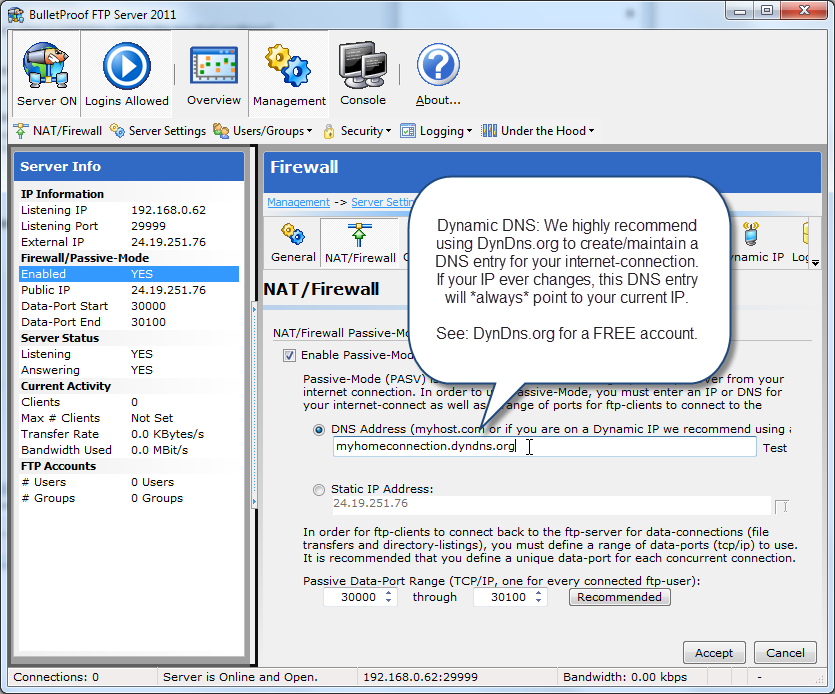
The first thing to do when setting up BulletProof FTP Server 2011 is to configure it to operate behind your NAT/Firewall (HOWTO).
This is called Passive-Mode (PASV) support and is a must for most installations. However many NAT/Firewalls have a “feature” called Stateful-Packet-Inspection or SPI (INFO) that sniffs the network-traffic for FTP packets and mangles the information in the packets to dynamically open ports on your firewall. Sadly, it almost always fails to correctly change the entire packet. In order to “help” SPI, it’s recommend to change the Static IP Address to the Listening IP address for your machine running BPFTP Server.
In order to better “cooperate” with SPI, it’s recommend that you try changing the Static IP Address under Management -> Settings -> NAT/Firewall to the Listening IP on the left side of the main-screen under Server Info.