BPFTP Client 2009 (Updated)

March 13th, 2009

The latest version of BulletProof FTP Client 20009 was released today. This new version includes a number of enchancements to the Bookmarks Manager, miscellaneous bug-fixes and a new “DEBUG MODE”.

In order to obtain this update, please visit the download-page for the software and simply download/install it:
http://bpftp.com/products/bpftpclient/windows/download

HOW-TO: License and Registration Codes

December 4th, 2008

We’ve published a new HOW-TO for BulletProof FTP Server which details how the license-file is stored on your computer. This license-file, called bpftpserver.txt, contains your license-information in the form of 4 registration-codes which you received with your purchase.

This HOW-TO give specific information on the license-file, how/where it’s stored, what it contains. It also contains common pitfalls for customers which have purchased the software, installed the codes, but still get a message that their copy is still UNREGISTERED.

Click to View:
HOW-TO: License and Registration Codes

IE7 will not download from FTP Server

November 13th, 2008

Starting with Internet Explorer 7 from Microsoft, certain “security” settings were put into place to protect Microsoft Windows users from being able to view certain types of documents stored on a FTP Server. These document types include .DOC, .XLS, .DOCX, .PDF, .DWG, etc…

The interesting thing is that when using IE7 as an FTP Client to download these types of files from BulletProof FTP Server (or any FTP Server), the file will download correctly and will be stored in the user’s temporary directory on the local-os, then; prior, to executing the application which is associated with the document type, some other Microsoft process makes a security-determination on the file and decides to delete the file or not (without prompting the OS-User). This results in an error message to the User, indicating that the file could not be downloaded.

More Information from Microsoft is available at the following KB:
http://support.microsoft.com/kb/910274

PLEASE NOTE
While Microsoft’s Documentation and instructions on implementing the fix is correct, the Windows Registry Key for the fix is INCORRECT. In addition, Windows XP SP3 DOES NOT include a working HOTFIX (as they state).

Incorrect Registry Key
HKEY_CURRENT_USER\Software\Microsoft\Internet Explorer\Main\FeatureControl\FEATURE_PERMIT_CACHE_FOR_AUTHENTICATED_FTP_KB910274

Correct Registry Key
HKEY_LOCAL_MACHINE\SOFTWARE\Microsoft\Internet Explorer\Main\FeatureControl\FEATURE_PERMIT_CACHE_FOR_AUTHENTICATED_FTP_KB910274

Defending Brute-Force Attacks against FTP Server

October 24th, 2008
Attempts at Bruce-Force Logins

Attempts at Bruce-Force Logins

You might have seen it before, tons and tons of login attempts as random users in your installation of BPFTP Server.

This is the result of a brute-force attack against the FTP Server and results in thousands of login-attempts to the ftp-server using common user-name and either default or dictionary based passwords.

The attacker is usually using several computers, from different points in the world against thousands and thousands of computers on the internet. Once a common tcp/ip port (like ftp’s port 21) is identified, it enters a mode of attack in which a connection is made to the ftp-server and the brute-force attack begins.

Kick+BAN Setting under Options

Kick+BAN Setting under Options

In order to combat these types of attacks, we’ve included a feature call Kick + BAN. Turning on this feature (off by default) will automatically detect these types of attacks and help to thrawt the attack by severing the control-connection and adding the attacker’s IP to the banned-ip-list, keeping them from ever connecting again.

The setting can be found by pulling down the menu Setup -> Main -> General and clicking on Options found in the left panel, then look for the checkbox labeled Limit USER / PASS.

We recommend setting the number of attempts to 5 and set the Kick + BAN.

Please Note: The Kick + BAN feature works against common brute-force attacks, where the attacker opens the control-connection and leaves it open for each login attempt made. This is a common method as the amount of time it takes to establish a tcp/ip connection for each attempt is considerably lengthy and would drastically reduce the effectiveness of a brute-force attack if a new connection needed to be made each time.

Ordering System is experiencing intermittent problems (Plimus)

October 23rd, 2008

Update Oct 24, 2008 3:00pm Pacific GMT-8
The ordering links are behaving normally and the problem has been resolved. If you have any issues, please refresh the page to receive the latest ordering links.

Our apologies, but our sales-partner PLIMUS started experiencing intermittent problems starting today Oct 23, 2008 at 8:15am Pacific GMT-8.

The problem causes the ordering links to be sometimes very slow to respond. If you have a problem viewing the ordering links, please click the REFRESH button and see if the there is still a problem. If the link does not come back up, please wait a few minutes and try again.

We are working to resolve this problem ASAP; if you would like to be informed via EMAIL as soon as they are available again, please email us at the below link:
http://builtbp.com/contactus

This issue is very important to us and we will work at getting it resolved ASAP. Please email us with any questions.

Again, we apologize for any inconvenience this may have caused.

McAfee Anti-Virus thinks there’s a VIRUS **RESOLVED***

September 9th, 2008

Starting sometime last weekend, McAfee updated their virus definitions and is now erroneously identifying our software as containing a virus. We are working with McAfee to get this fixed and we’re hoping to get it resolved ASAP!

STATUS: RESOLVED!

As of today, Sep 10, 2008, McAfee has been very responsive and resolved the issue with their latest Virus DAT 5380. If you are experiencing a problem, make sure your Anti-Virus is update to date.

PROBLEM DESCRIPTION

The problem seems to manifest itself in two different ways:

1) BPFTPSERVER.EXE is our main executable and in Virus Definition DAT 5379, the file is being misidentified as “potentiallyFalse Trojan“. As of today, Sep 9 2008, we received word back from McAfee that this has been corrected with Virus Definition DAT 5380.

2) BPFTPSERVER-SERVICE.EXE is the executable which manages BPFTP Server while it’s running as a Windows Service. In the current virus definition DAT 5379, this is being misidentified as “G6SERVICE Potentially Unwanted Program”. While we’re not sure why it got labeled as a “potentially unwanted program”, the G6SERVICE piece is because it shares a majority of code with an ancestor of BPFTP Server called G6FTP Server, which was rebranded about 6 years ago. As of today, Sep 10, we’ve configirmed that Virus Definition DAT 5380 fixes the problem.

FIXING THE CORRUPTION CAUSED BY MCAFEE ANTI-VIRUS

Again, we are working with McAfee to get this corrected as soon as possible as it certainly affects us all very much. Please continue to make sure your virus definitions are up-to-date with McAfee, alternatively you can tell it to ignore the installation directory for the software and prevent this problem from ocurring.

If McAfee Anti-Virus has already deleted these files, they can be resurrected by downloading/installing the current version from our website. Before installing the current version, please copy the *.INI files from your installation directory to a safe location and install in the same directory. This will help to ensure that everything goes smoothly with your upgrade.

Barcode/Label Magic’s Supported Barcode Types

August 11th, 2008

Today, we published additional information on the types of barcodes (symbologies) supported by both Label Magic and Barcode Magic. With Label Magic, these barcodes are available to label-definitions; for Barcode Magic, the barcodes are available for generation and export into your favorite Windows application (Adobe PageMaker, Microsoft Word, Adobe Illustrator, Microsoft Excel, etc).

The supported barcode types include:
UPC-A and UPC-E
Code 3 of 9 (normal, check-digit and extended)
Code 93
Code 128
EAN-8 and EAN-13
GS1-128 and EAN-128
Interleaved 2 of 5
POSTNET
SSCC-14 Interleaved

More Information:
Label Magic Supported Barcode Types
Barcode Magic Supported Barcode Types

Create a Login-Message with Recently Uploaded Files

June 30th, 2008

Let’s say you want to create a login-message for a ftp-user, to display the most recently uploaded files. Commonly this is called a “Message-of-the-Day” aka MOTD.

First, you’ll need to setup a directory structure for your BPFTP Server installation. I commonly create a “bin” directory and then go from there. Here is a write-up on setting up directory structures.

Next, you’ll want to create a batch-file with the following lines (save this to your “bin” directory as “event-fileuploaded.cmd”:

@echo off
echo %DATE% %TIME% - File Uploaded [%1] for %2 bytes >> c:\ftp\motd.txt

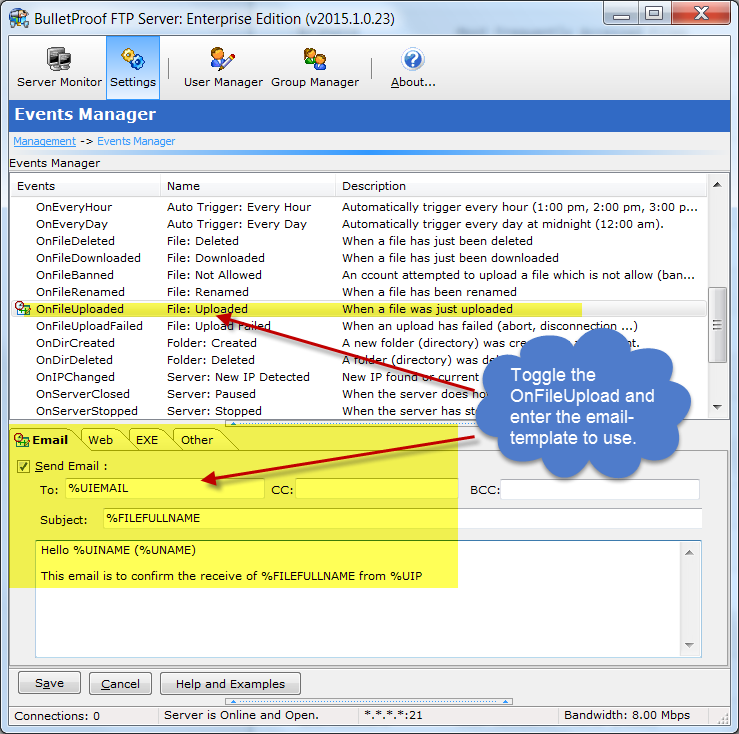
Thirdly, you’ll need to connect this batch-file to the “OnFileUpload” event under the “Events Manager” in BPFTP Server (Ctrl-E). Scroll down until you see the event, then Check-ON the option “Execute” and put in the following command-line:

c:\ftp\bin\event-fileuploaded.cmd %FILE %FILESIZE

Lastly, you need to edit the user which can see the MOTD in “User Accounts” (Ctrl-U) and click on the ftp-user and then “Links & Messages”, Check-ON the “Show Login Message” and type in “c:\ftp\motd.txt” for the file to display.

That’s it! You can test this by logging into the ftp-server, upload a file and then log-in again to see the MOTD!

Network-Shares via FTP when running as a Windows System Service

June 19th, 2008

We’ve updated our HOW-TO documention for Running BPFTP Server as a Windows System-Service to include additional documentation on mapping network-drives and exposing the contents via FTP to your users. For more information see the section Optional: Network-Share Support.

Setup Network Shares via FTP

June 1st, 2008

BulletProof FTP Server full supports the ability for ftp-users to access network-shares via FTP. Allowing you to grant remote access to network files, residing on other computers in your network.

Full HOW-TO Documentation